You've got a resume that looks strong on paper. The hard part isn't writing it, it's figuring out whether it matches the job you want. That's where the best resume scanner earns its keep, but only if it does more than spit out a generic keyword score. A useful report should show matched terms, missing terms, placement or context issues, suggested edits, and the limits of the scan, because ATS behavior is mostly about parsing, ranking, and comparing inside systems that large employers already use, not simple hard rejection rules (ATS usage in Fortune 500 employers). Jobscan's annual Fortune 500 audit has put that adoption at roughly 97 to 98% for several years running.
I'm ranking these tools by how repeatable and practical they are when you test one resume against one target job description, then reviewing the feedback depth, tailoring guidance, and workflow fit. If you're still choosing where to build the resume in the first place, our ATS resume builder comparison covers that half. This list is about checking a finished draft against a real posting.
Table of Contents
- 1. FindMeJobs
- 2. Jobscan
- 3. Resume Worded
- 4. Teal
- 5. SkillSyncer
- 6. Rezi
- 7. Enhancv
- Top 7 Resume Scanners Feature Comparison
- How to Run a Fair Resume Scanner Test
- Frequently Asked Questions
- Choose the Scanner That Matches Your Workflow
1. FindMeJobs
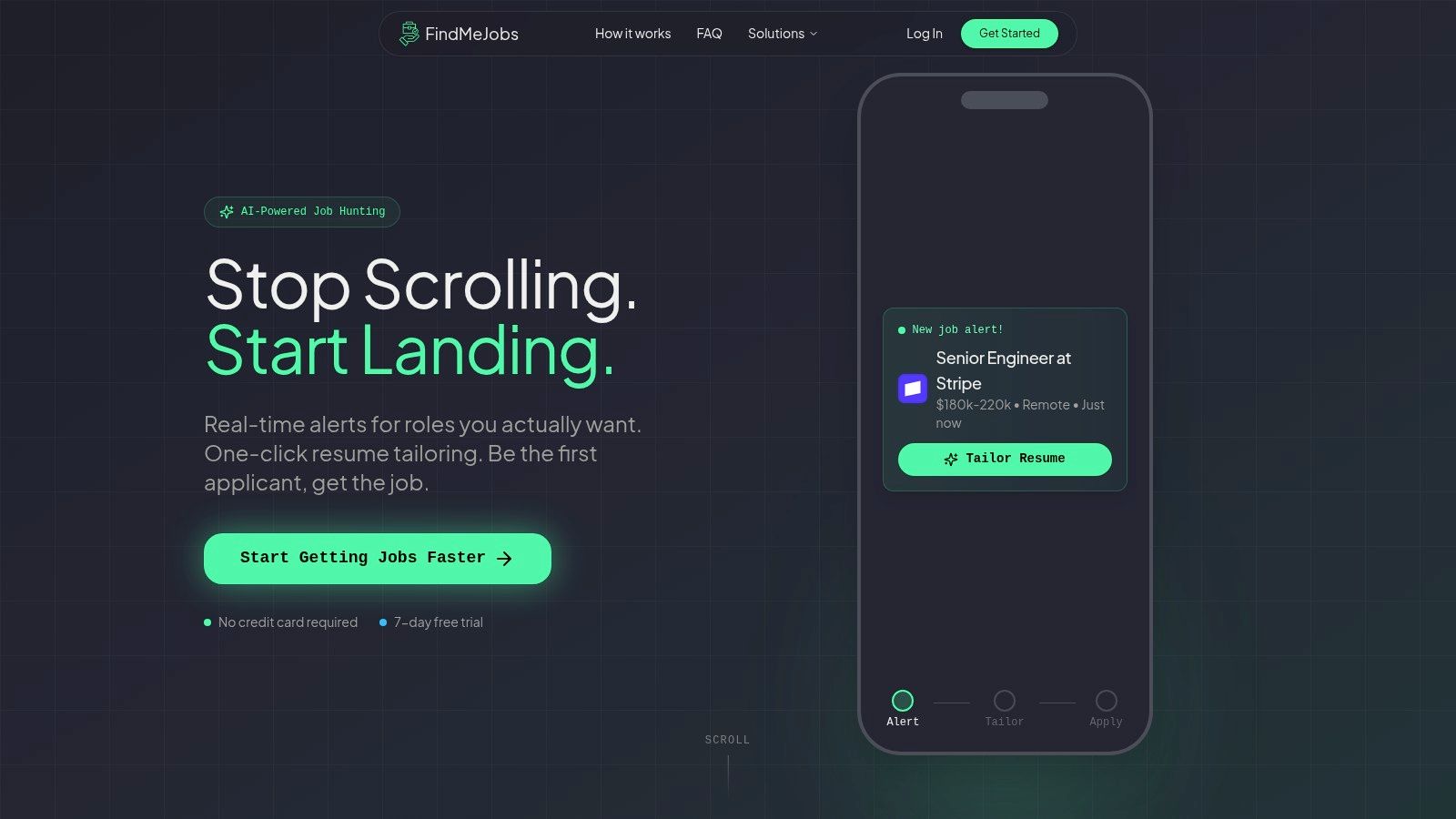
FindMeJobs is the most useful option when speed is the test. If you're chasing a role that could attract a flood of applicants, our job alerts and tailoring flow are built to help you respond before your competition even finishes scanning the posting. Our Smart Search Agents monitor major job boards and public LinkedIn postings around the clock, and alerts arrive 0 to 10 minutes after a role goes live. That matters because early submission changes your position in the queue for human review.
Why it ranks first for repeatable testing
The strongest scan here isn't a static score, it's the path from job alert to applied resume. CoApply AI reads the posting and proposes exact text edits, and the tailoring step takes about 30 seconds. That makes it easier to run the same repeatable test every time: compare resume version against posting, inspect missing skills, adjust phrasing, and export an ATS-optimized PDF without bouncing between separate tools. We also support PDF and DOCX import, plus a split-screen editor with live preview, so you can see whether the scan result turned into a clean, submission-ready document.
Practical rule: if a scanner doesn't help you edit the resume in the same workflow, you'll waste the momentum created by a strong match report.
Best fit and trade-offs
For technical candidates, the value is obvious. You can filter by title, salary, company, and location, then use the exact job posting to tailor the resume immediately. There are also Claude and ChatGPT integrations, which help if you want AI assistance without rebuilding your resume from scratch.
- Best for: fast-moving applicants who want job-specific tailoring, not just ATS commentary.
- Strength: the alert-to-edit workflow is unusually tight, especially for people applying to many postings.
- Trade-off: it's a subscription product, so the key question is whether the speed advantage is worth it after the 7-day free trial (no card required).
- Important limitation: coverage depends on LinkedIn's operating regions, so some searches are naturally narrower.
The cleanest way to judge FindMeJobs is simple: use one posting, check the match, apply the edits, and see whether the final export still reads naturally to a recruiter. Its main advantage isn't a flashy score, it's helping you act on the score quickly. FindMeJobs also keeps the process focused on the exact document you plan to submit, which is what matters most when timing is part of the strategy.
2. Jobscan
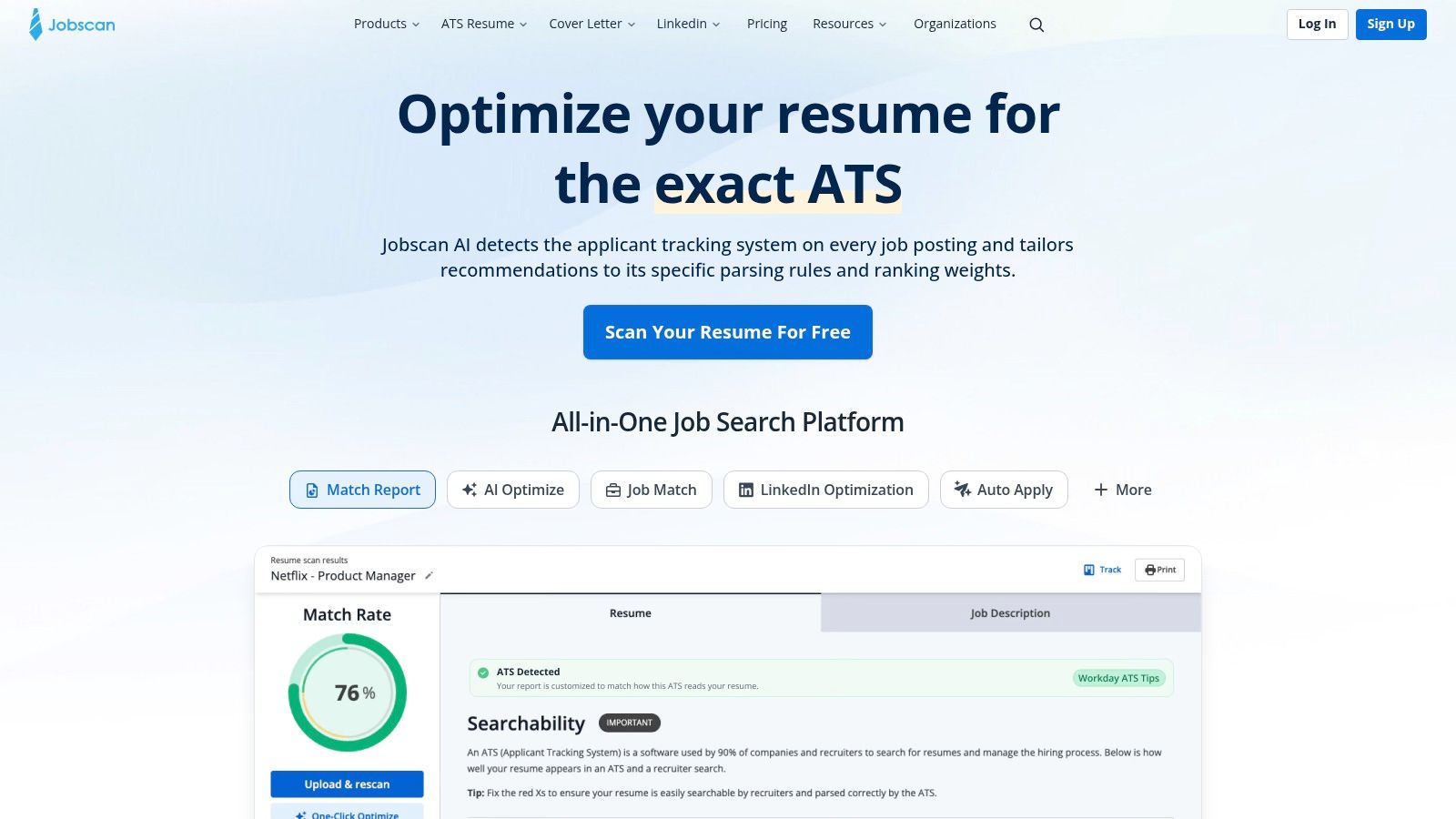
Jobscan stays near the top because it's one of the most established resume-to-job-description comparators. When you paste in a posting, its Match Report separates keywords, hard skills, soft skills, and recruiter terms, which makes the report easy to sanity-check against the original ad. For anyone comparing a polished resume to a detailed technical posting, that term-by-term visibility is the difference between a score you can ignore and a revision plan you can use.
What the scan actually gives you
Jobscan's strength is that it doesn't stop at a vague fit score. The builder lets you work on the resume while watching live scoring, and the ecosystem includes LinkedIn optimization, cover letter support, a job tracker, and an Auto Apply workflow that still keeps review in the loop. That makes it practical if you want one place to compare a resume against a job, refine the language, and keep track of the applications that came out of the scan.
The trade-off is straightforward. Jobscan can feel like a heavier ecosystem than a pure scanner, and some users will hit the limits of the free tier quickly. It's a better choice when you want a mature system around the scan, not just the scan itself.
Best fit and trade-offs
Jobscan is strongest for candidates who apply to detailed roles and want a report that tells them exactly what changed between the resume and the posting. It's also a good fit if you care about LinkedIn alignment and job tracking in the same place.
- Best for: users who want a deep keyword comparison plus adjacent tools.
- Strength: detailed deltas, especially useful for roles with long requirement lists.
- Trade-off: premium pricing can feel steep versus lighter scanners.
- Workflow note: the value shows up when you compare the same resume across multiple jobs and watch which terms keep missing.
A useful Jobscan report should answer three questions quickly: what matched, what's missing, and whether the missing terms belong in the summary, skills block, or bullets. If it can't tell you that, the score is doing too much and the guidance too little. For many applicants, though, Jobscan's layered comparison still makes it one of the most reliable ways to test a resume against a posting.
3. Resume Worded
Resume Worded earns its place because it splits the problem into two parts. Score My Resume checks the document for structure, impact, and ATS readiness, while Targeted Resume compares it against a specific job description and flags missing keywords. That combination makes it especially useful when your resume is already polished but needs sharper evidence, clearer phrasing, or better alignment with the posting.
Why the feedback feels more editorial
This tool is strongest when you want line-level feedback, not just matching math. Its suggestions lean into clarity and impact, and the AI rewrites help if you know the point you want to make but not the cleanest way to write it. The setup is also easy to explain to a job seeker: run the general quality check, then run the role-specific comparison.
That makes it practical for people who want to tighten language before they obsess over keyword gaps. If another scanner says you're missing a skill, Resume Worded can help you decide whether the issue is phrasing, placement, or substance.
A scanner is most useful when it tells you what to change and why, not just where you fell short.
Best fit and trade-offs
Resume Worded works well if your resume needs a stronger human read as well as a better ATS fit. It's also a sensible choice for people who want transparent pricing tiers and a tool that doesn't force them into a full builder workflow.
- Best for: candidates who want writing feedback plus targeted matching.
- Strength: strong guidance on clarity, impact, and line-by-line refinement.
- Trade-off: after a few passes, some feedback can start to feel generic.
- Limitation: it's less specialized for technical parsing than tools that focus heavily on keyword extraction.
The repeatable test here is clean: compare the same resume to the same posting, then see whether the report helps you rewrite bullets more intelligently. If you keep getting the same generic advice, the scanner is probably not adding enough, and why your resume isn't getting responses covers the failure modes a score won't catch. If the edits become more specific on each pass, it's doing its job.
4. Teal
Teal is the best fit for people who need the scanner to sit inside a real job search system. Its Match Score shows keyword coverage for each saved job, and the Resume Analyzer checks structure and clarity, so the workflow moves from job save to tailoring without a lot of friction. That matters if you're juggling a stack of applications and don't want to rebuild the process from scratch every time.
The workflow advantage
Teal works well because it connects the scan to action. You can save a posting, review what's missing, tailor the resume, and track the application in one place, which means the scanner isn't a one-off diagnostic. It becomes part of an ongoing process, especially for users handling several open roles at once.
The free tier is also useful, which gives lighter applicants a way to test the workflow before paying for more advanced features. If you're comparing scans across multiple jobs, Teal's organization can matter more than a slightly deeper keyword report elsewhere.
For job hunters who want help moving from saved posting to revised resume, its AI bullet and summary tools make the process even faster. The best use case is not perfection, it's momentum.
Best fit and trade-offs
Teal is a strong option for candidates managing multiple opportunities at once, especially when the question is which resume version belongs to which job. The internal workflow is the point, not just the output.
- Best for: organized applicants who want tracking, tailoring, and scanning in one workspace.
- Strength: easy to move from saved job to edited resume.
- Trade-off: scanner depth is solid, but not as granular as specialist tools.
- Limitation: the fullest keyword visibility sits behind Teal+ features.
If you want job-specific tailoring attached to the alert itself, start with our AI job search tools, especially if you're comparing speed-first alerting against Teal's workspace model. Teal wins when your priority is managing many applications cleanly, not chasing the earliest alert. Its scanner is useful because it sits inside a repeatable workflow you'll keep using.
5. SkillSyncer
SkillSyncer is the no-nonsense keyword tool in this list. It focuses on resume-to-job-description matching, shows missing keywords, and marks issues in place while you edit, which makes it easy to understand what changed and why. If you don't want a full ecosystem, that focused approach is a real advantage.
What makes the report practical
The live match scoring is the core feature here. Instead of making you guess whether the change helped, SkillSyncer updates the score as you edit, so you can test wording choices immediately. It also shows the exact words to change, which is useful when you want editing help that feels more literal than strategic.
That specificity is what many scanner roundups miss. A useful report doesn't just say you're short on a skill, it shows where the gap lives and how to close it without breaking the resume's tone. SkillSyncer leans into that directly.
Its free plan also gives weekly scans, which makes it a decent choice for ongoing job searches where you want to compare a resume against a few new postings every week. The AI credits are metered on the free plan, so the free version is better for deliberate testing than heavy rewriting.
Best fit and trade-offs
SkillSyncer makes the most sense for applicants who care mostly about keyword alignment and don't need a larger builder ecosystem around it. If your process is upload, compare, edit, export, repeat, it fits neatly.
- Best for: people who want a focused scanner with practical edit guidance.
- Strength: exact wording suggestions are easy to act on.
- Trade-off: smaller ecosystem than all-in-one tools.
- Limitation: the free plan is useful, but AI access is limited.
If you want to connect that keyword focus to role-based searching, our skills pages are the useful comparison point, because they help you discover roles by skill first, then tailor after the alert. SkillSyncer is the tighter scanner, but it's not trying to be your job search home base. It's best when you already know which posting you want to target and only need the resume gap closed cleanly.
6. Rezi
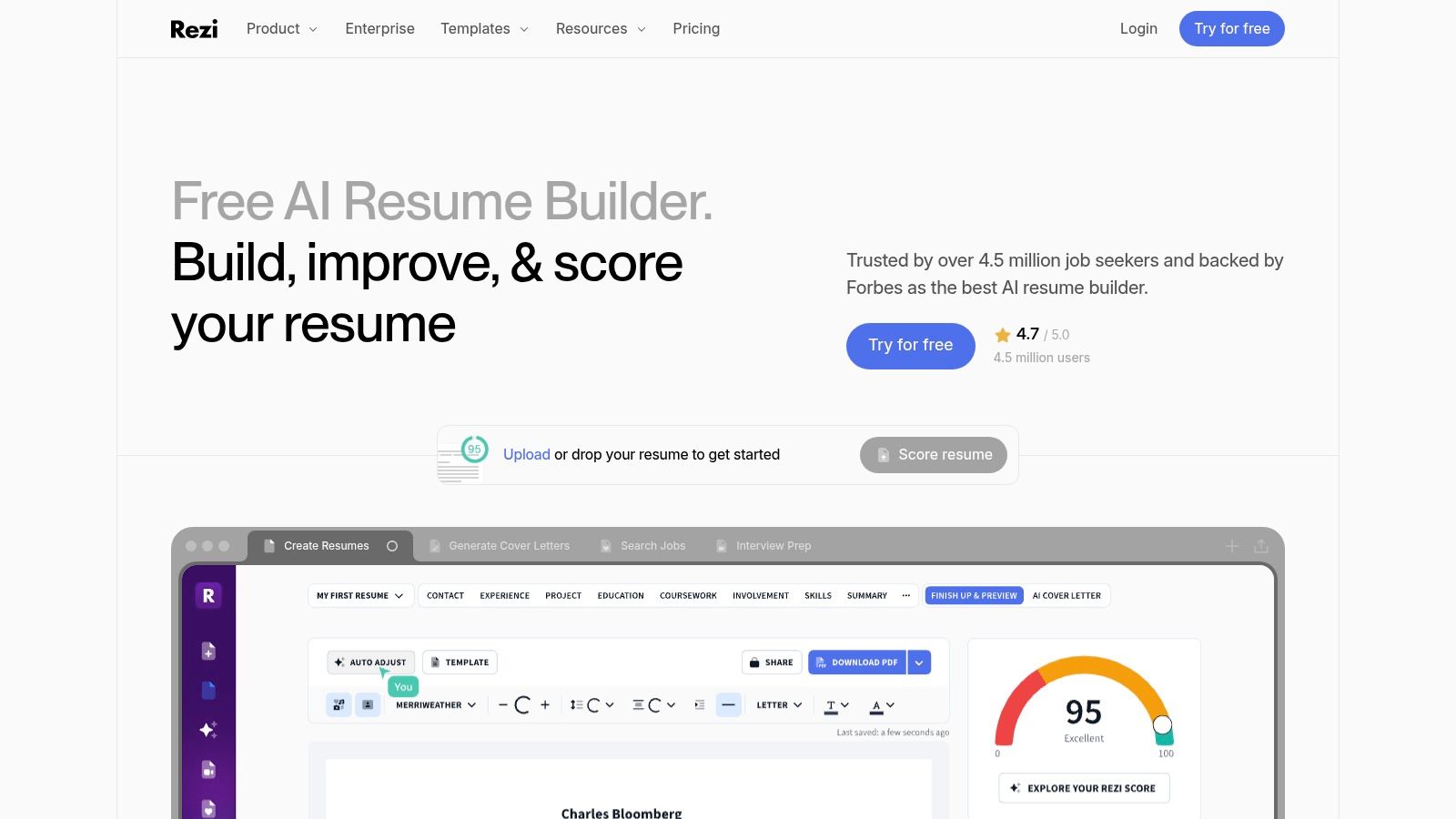
Rezi sits in the builder-plus-checker category, which is useful if you want to tailor while you write. Its ATS Resume Checker pairs with Keyword Targeting, and the Rezi Score uses 23 metrics to evaluate the document. That combination matters when the resume needs structural cleanup, content tuning, and job-specific alignment all at once.
Why it works best inside its editor
Rezi is most useful when you build inside Rezi rather than importing a finished resume and hoping the scan understands everything perfectly. That's not unusual for builder-centric tools. The advantage is that the checker, the templates, and the editing environment all point toward the same ATS-safe output.
Its real-time checks cover filler words, quantified bullets, and clarity, which makes the report more than a keyword mirror. If your goal is to move quickly from rough draft to submission-ready document, that integrated approach saves time.
The human review add-on also gives the tool a more serious feel for people who want a last-pass sanity check. You're not just trusting automation, you're giving yourself another layer before the application goes out.
Best fit and trade-offs
Rezi fits long-term users who want a builder and scanner together, especially if they expect to tailor often. The lifetime-plan angle will appeal to people who want to keep using the same environment rather than switching tools each month.
- Best for: users who want an editor-and-checker combo.
- Strength: strong for fast tailoring inside a single workflow.
- Trade-off: imported resumes don't always behave as well as native builds.
- Limitation: the lifetime plan leaves out the monthly human review included in Pro.
A good Rezi report should do more than confirm ATS readiness. It should make the resume easier to edit, cleaner to read, and closer to the posting without sounding stuffed. If you're rebuilding from scratch, that integrated path can be a real advantage.
7. Enhancv
Enhancv is the best fit for people who want a visual builder with ATS checks built in. Its ATS Check compares your resume to a specific job offer, while the Content Analyzer flags structural and writing issues. That combination gives you a practical mix of design control and scan feedback, especially if you care how the final resume looks as much as how it parses.
Where it stands out
The biggest advantage here is clarity inside the editor. Enhancv gives you a modern workspace, structured feedback, and AI-powered helper features for checking and tailoring, so you can see the resume as both a document and a submission artifact. For applicants who dislike plain, rigid builders, that matters.
The scanner is strongest when the resume is already being built in Enhancv. That's not a flaw so much as a design choice. The tool is trying to keep the content and presentation aligned, which is useful if you want a polished final output without sacrificing basic ATS readiness.
The Pro plan adds more support for multiple resumes and cover letters, so heavier applicants can keep different versions organized. That's helpful when one core document needs small shifts for different roles.
Best fit and trade-offs
Enhancv is a good choice for applicants who want a cleaner visual experience without giving up ATS feedback. It won't satisfy people who want the deepest parsing analysis, but it does deliver a balanced builder-and-checker workflow.
- Best for: users who want a modern visual editor plus ATS checks.
- Strength: structured feedback is easy to act on.
- Trade-off: the scanner is best when you stay inside the platform.
- Limitation: some advanced features sit behind Pro.
When you compare it to the other tools, Enhancv is less about aggressive keyword hunting and more about making the final resume look deliberate, readable, and job-aligned. If that's your workflow, it's a sensible option. If you need the most forensic scan, one of the more specialized tools will usually give you more detail.
Top 7 Resume Scanners Feature Comparison
| Product | Setup effort | Cost | Expected outcome | Ideal use case | Key advantages |
|---|---|---|---|---|---|
| FindMeJobs | Low: set up Smart Search Agents and mobile alerts | Weekly subscription with a 7 day free trial, no card; optional Telegram; coverage follows LinkedIn's regions | High for early applications; a faster apply-to-interview pipeline when timing matters | Job seekers in competitive markets who need to apply immediately | Alerts 0 to 10 minutes after posting; AI-driven, job-specific resume edits; strong integrations |
| Jobscan | Low: upload resume and job description, review the detailed report | Premium subscription for heavy use; limited free scans | Strong keyword matching and gap analysis; detailed match reports | Technical roles, long or complex JDs, university career centers | Deep term-by-term analysis; mature toolset (builder, LinkedIn, tracker) |
| Resume Worded (Score My Resume + Targeted Resume) | Low: run scoring and targeted comparisons | Tiered pricing; coach and agency plans available | Clear line-by-line feedback; improved clarity and impact | Improving writing quality and targeted alignment for individual roles | Actionable line edits, AI rewrites, transparent pricing |
| Teal | Low: save jobs, view Match Score, tailor in the workspace | Useful free tier; Teal+ for advanced features | Good workflow impact; efficient multi-application management | High-volume applicants managing many JDs and applications | Integrated workspace, tracker, Chrome extension for fast iteration |
| SkillSyncer | Very low: simple resume vs JD scans with in-place suggestions | Lower-cost premium; free weekly scans | Good for keyword alignment; a live match score while you edit | Budget-conscious users focused on keyword optimization | Affordable, specific wording suggestions, practical free plan |
| Rezi | Medium: best results when building inside the Rezi editor | Subscription or lifetime plans; optional human review add-on | Strong ATS scoring (Rezi Score); real-time content checks | Users building ATS-safe resumes or wanting long-term toolkit value | 23-metric score, ATS-safe templates, real-time clarity checks |
| Enhancv | Low to medium: visual editor with ATS check | Pro subscription for advanced features | Good visual and ATS readiness; the content analyzer flags issues | Candidates needing modern, design-forward resumes with ATS checks | Modern editor, structured feedback, AI tailoring helpers |
How to Run a Fair Resume Scanner Test
Scores don't compare across tools. A 72 in one scanner can be an 85 in another, because each vendor weights keywords, sections, and formatting differently. So don't pick a tool by its number. Pick it by what it helps you fix. Here's the test to run on any of the seven:
- Pick one real posting you'd actually apply to, and save the full job description as text.
- Run the same resume file through each scanner. Same file, same posting, no edits in between.
- Write down the missing terms each tool flags, and where it wants them: summary, skills block, or bullets.
- Make only truthful edits. If a missing term describes work you've done, add it in context inside a bullet. If it doesn't, leave it out.
- Export, then paste the file into a plain text editor. If your name, work history, and skills come out in a sensible order, a parser will read it. If the order breaks, fix the layout before the wording. A single-column template like the one in our free resume builder avoids most of those problems.
- Rescan once. A good tool shows the gap closing for reasons you can explain. If the score jumps and you can't say why, the tool is rewarding keyword stuffing.
When you line the reports up, this is what separates a useful scan from a vanity score:
| Report element | What it tells you | Red flag |
|---|---|---|
| Matched terms | Which of the posting's requirements you already cover | Counts a term that only appears in your contact block or a hidden line |
| Missing terms | The gap between your resume and the posting | Lists every noun in the ad, including "team player" and "self-starter" |
| Placement or context | Whether a term sits in a bullet with evidence or only in a skills list | Treats a keyword in a bullet and one in a list as the same thing |
| Suggested edits | Specific rewrites you can accept or reject | Generic advice that repeats on every scan |
| Scan limits | What the tool can't see: knockout questions, recruiter searches, the employer's ATS settings | Claims to predict whether an ATS will reject you |
Frequently Asked Questions
What does a resume scanner actually check?
It parses your resume the way an applicant tracking system would, then compares the text against a job description you paste in. Most report matched and missing keywords, hard and soft skills, section headings, and formatting problems that break parsing. The better ones also tell you where a missing term belongs and suggest a specific edit.
Can a resume scanner tell you if an ATS will reject your resume?
No. A scanner simulates parsing and keyword matching, but it cannot see the employer's setup: knockout questions, the search terms a recruiter types, or how the ATS is configured to rank applicants. Most applicant tracking systems parse, index, and rank rather than auto-reject, so treat the scan as a way to improve fit, not a pass or fail verdict.
What is a good resume match score?
There is no universal passing number. Every tool weights keywords and sections differently, so a 70 in one scanner can be an 85 in another. Use the score to compare versions of your own resume against the same posting inside the same tool. If it rises because you added true, relevant terms in context, you are moving the right way.
Are free resume scanners good enough?
For a first pass, yes. The free tiers from Jobscan, Resume Worded, Teal, and SkillSyncer show missing keywords and basic formatting issues. You pay for unlimited scans, deeper reports, and AI rewrites, which start to matter once you are tailoring for several applications a week.
Choose the Scanner That Matches Your Workflow
The best resume scanner for you depends on how you apply, not on which tool sounds smartest on a product page. Pick FindMeJobs when rapid job discovery and exact, job-specific tailoring are central. Use Jobscan when you want detailed keyword and recruiter-term comparisons. Choose Resume Worded when line-level writing and impact feedback matter most. Go with Teal if your real problem is keeping many applications organized. SkillSyncer fits focused keyword alignment. Rezi works well if you want an editor and checker in one place. Enhancv is the better pick when you want a visual builder with ATS and content checks.
The most reliable way to test any of them is the same every time. Run the same resume and the same target posting through the scanner, record the missing terms and structural warnings, make only truthful edits, export the result, and review the final document before you apply. That repeatable process tells you far more than a single score ever will, because it shows whether the tool helps you improve the resume in a way a human recruiter can use.
If you want a speed-first way to do that, FindMeJobs combines alerts, AI tailoring, and ATS-aware output in one workflow. Start with the posting, apply the exact edits the scan suggests, and use the result to move faster without losing relevance. Visit FindMeJobs if you want a job-specific scanner that helps you tailor and submit before the crowd does. It starts with a 7 day free trial, no card required.