You tailor your resume, upload it, answer the same application questions for the tenth time, and hit submit. Then nothing happens. No interview request. No rejection. Just silence.
Most job seekers assume that silence means, “I wasn't qualified enough.” Sometimes that's true. Often, though, your resume disappeared earlier than you think. It may have stumbled in software before a recruiter ever gave it a real look.
That software is usually an Applicant Tracking System, or ATS. And ATS resume review isn't one single judgment. It's closer to a chain of checkpoints. First, the system has to read your resume correctly. Then it has to decide whether your background looks relevant to that specific job.
ATS screening is standard in modern hiring, not a rare edge case. A 2025 industry summary reported that 97.8% of Fortune 500 companies use an ATS, and a separate recruiter survey found 99.7% of recruiters use keyword filters inside their ATS to sort applicants, according to Apply Mate's ATS statistics summary.
If you've been applying online and hearing very little back, that doesn't automatically mean your experience is weak. It may mean your resume isn't making it cleanly through those early gates. That's a systems problem you can diagnose. If you've also heard that ATS software throws out most resumes on sight, our post on why your resume isn't getting responses covers where that number came from and what is really going wrong.
You submit a resume for a job that fits your background well. Your experience lines up. Your skills make sense for the role. Then the application vanishes into silence.
That silence often starts before a recruiter makes a real judgment.
High-volume employers receive far more applications than a person can read one by one, so software handles the first pass. An ATS resume review is part filing clerk, part search filter. It tries to read your resume, sort the information into the right boxes, and compare what it finds against the job posting.
That process creates two separate gates. The first gate is mechanical. Can the system read your resume correctly? The second gate is about meaning. Does your experience look close enough to this specific job to stay in the pile?
Those gates sound similar, but they fail for different reasons.
A parsing problem is like mailing a form that gets scanned crooked. The information may be good, but the machine struggles to place it correctly. A semantic matching problem is different. The machine reads the form just fine, then decides the content does not match what the employer asked for.
Job seekers often assume formatting is the whole story because it is easier to see. Fonts, columns, icons, and PDF quirks feel concrete. But content-job mismatch blocks strong candidates more often than unusual formatting alone. A clean resume for a marketing manager role will still struggle if the posting is really centered on demand generation, attribution, and paid acquisition, and your bullets mostly describe brand campaigns and general coordination.
Platform differences make this more confusing. One ATS may parse a layout without trouble, while another may split dates, miss a skills section, or weigh job-specific terms differently. A resume that clears one company's system can stall at another because the software setup, filters, and matching rules are not identical.
That is why ATS review helps to frame the problem correctly. Your goal is not to make a resume that pleases a mysterious robot. Your goal is to pass two early checks. First, make the document easy for software to read. Then make the substance clearly relevant to the role in front of you.
If you are applying to several roles at once, FindMeJobs is built to keep each tailoring decision tied to its posting instead of sending the same version everywhere.
An ATS resume review usually checks two different things, even though job seekers often hear them described as one fuzzy process.
A better mental model is a package label and the package contents. First, the system has to read the label and sort the box to the right place. Then it has to judge whether what is inside matches what the buyer ordered. Resumes fail at both stages, but content mismatch often causes more trouble than formatting alone.
The first gate asks a basic question: Can the system read your resume and turn it into usable data?
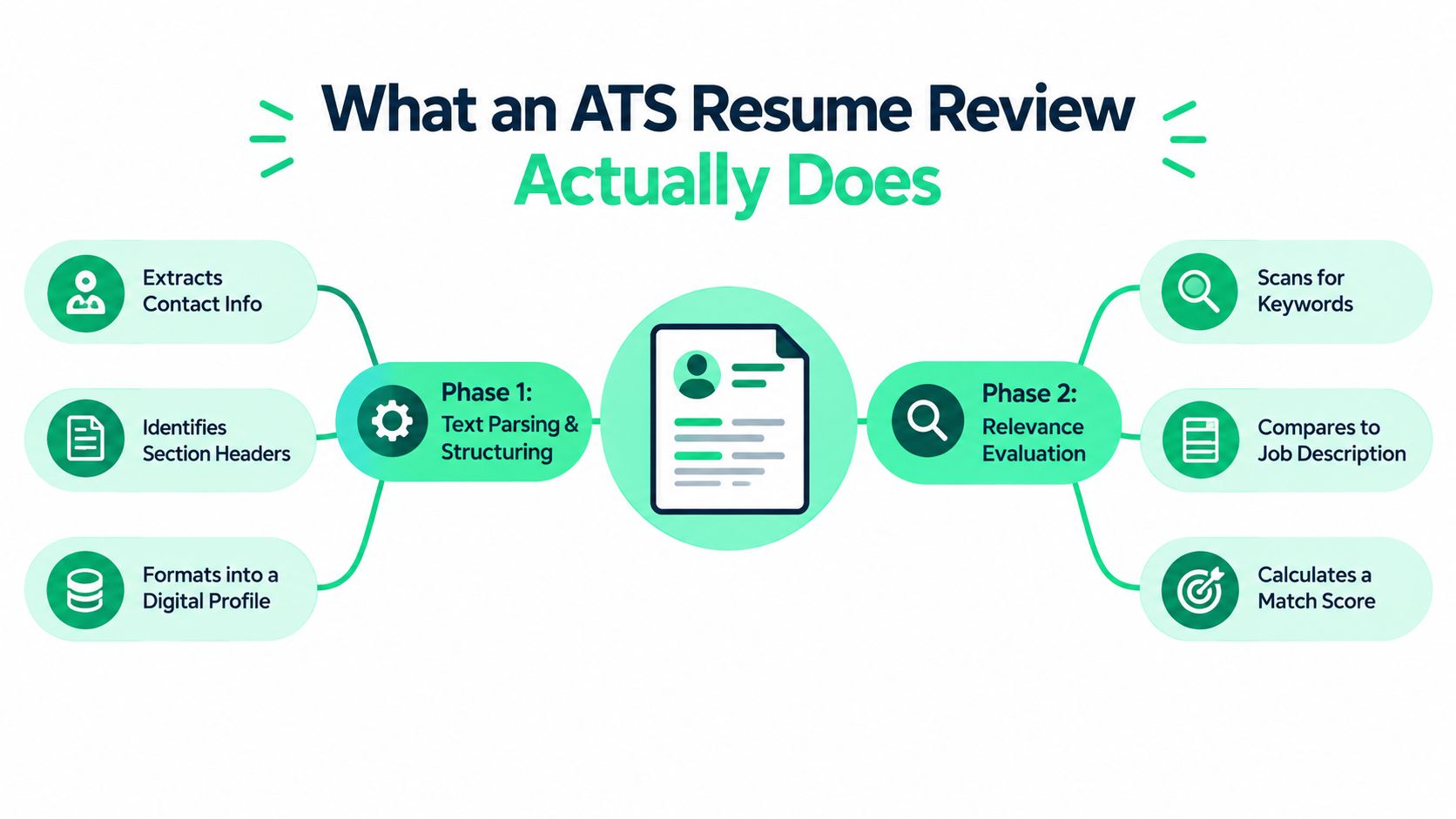
The ATS tries to pull out your name, contact details, job titles, employers, dates, education, and skills. It then places that information into fields inside a candidate record.
That sounds mechanical because it is. The software is not admiring your layout the way a recruiter might. It is looking for patterns it can map cleanly.
Analysts in an IJIRT-published ATS parsing summary reported lower parsing failure rates for DOCX files than PDFs, and better parsing accuracy for single-column resumes than two-column layouts. The lesson is straightforward. If the document structure is harder to interpret, the system is more likely to scramble or miss information.
A parsing review looks for problems like that. It checks whether your resume can be read reliably before anyone judges your experience.
Once the system has readable data, a second gate asks a different question: How closely does this candidate fit this specific role?
Many applicants get tripped up. They fix columns, remove graphics, export to DOCX, and still get filtered out. The reason is often not readability. The resume was parsed fine. The content just did not line up closely enough with the job.
Some ATS setups still rely heavily on exact keyword overlap. Others use broader language analysis to connect related skills and responsibilities. A 2025 research synthesis from TalentTuner's ATS research summary reported higher precision for platforms using NLP and semantic analysis than for legacy keyword-only systems.
In plain English, newer systems can sometimes recognize related ideas, not just identical words. If a posting asks for stakeholder communication, sprint planning, and cross-functional coordination, a resume describing agile delivery, team alignment, and program execution may still look relevant.
But "may" matters here.
Different platforms weigh relevance differently. One employer's system may reward close terminology matches. Another may give more credit for related experience, recruiter-set filters, or weighted skills. That is why one resume can perform well in one application portal and stall in another, even when the format stays the same.
Passing an ATS review usually means your resume cleared both gates well enough to stay in consideration. It became readable to the system and relevant enough to surface in search, ranking, or recruiter review.
That outcome is modest, but valuable.
Resumes matched closely to a posting tend to earn better results than resumes without role-specific customization. The practical takeaway is simple. ATS review is not one test. It is a readability check first, then a match check second.
A resume can fail for two very different reasons. One failure happens when the system struggles to read the file. The other happens when the system reads it correctly but does not see strong evidence that you fit the job.
That distinction matters because it changes the fix.
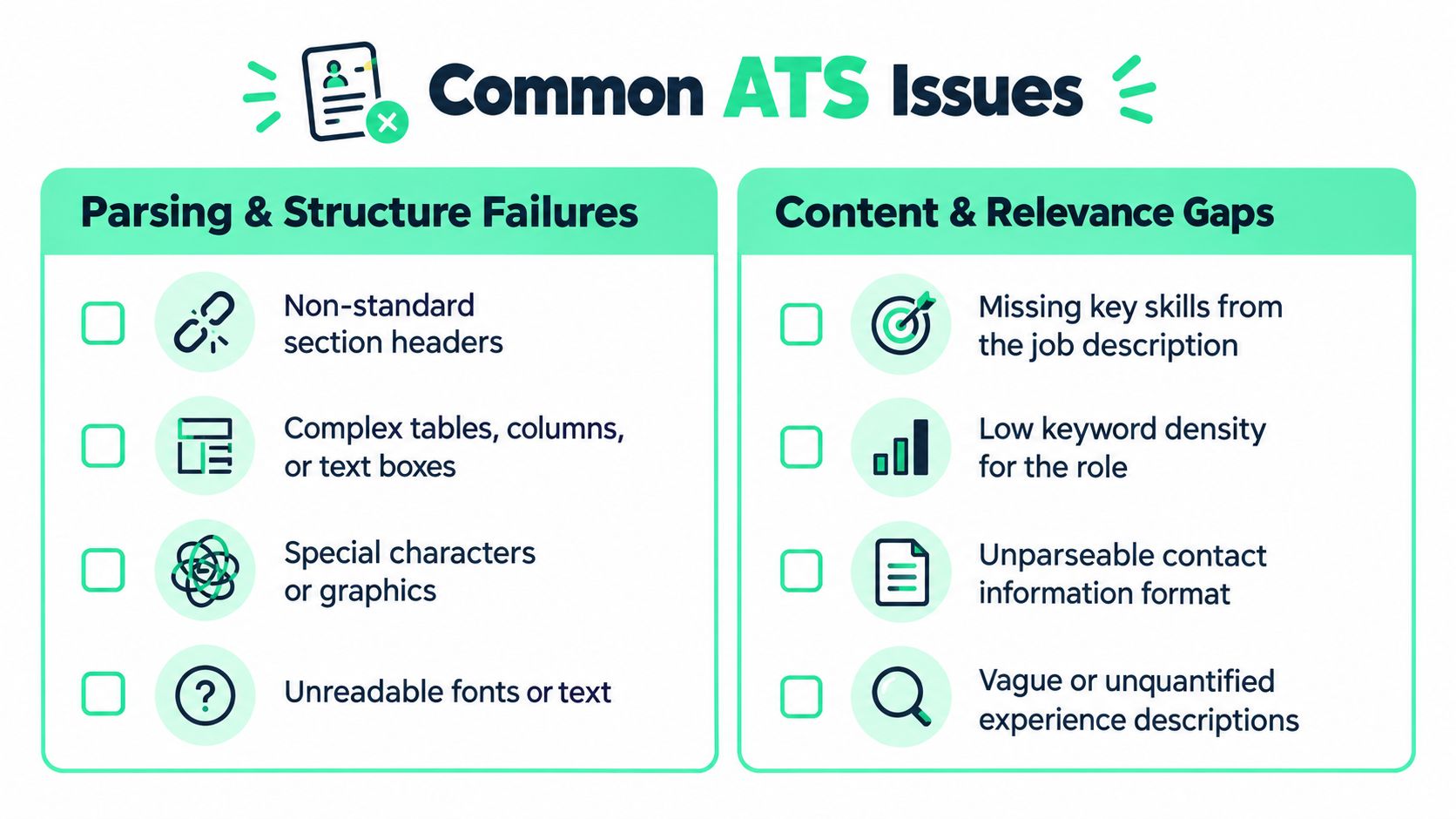
The first gate is basic readability. The ATS needs to turn your resume into usable fields, much like a clerk typing information from a paper form into a database. If the layout gets in the way, good experience can end up hidden, split apart, or misfiled.
These are common parsing problems and why they matter:
Header and footer contact details
Some systems do not read headers and footers reliably. If your email or phone number sits there, the ATS may miss it or store it in the wrong field. You could pass the relevance check and still become hard to contact.
Columns, tables, and text boxes
A person can scan two columns and understand the order instantly. A parser may read across the page instead of down it. That can attach dates to the wrong employer, merge separate roles, or jumble bullets into fragments.
Graphics and icons
Icons, skill bars, logos, and decorative dividers look clear to people. Software often treats them as stray characters or ignores them. The result is less information, not better presentation.
Nonstandard section labels
ATS platforms are better at recognizing familiar labels such as Experience, Education, and Skills. Creative labels like "Career Journey" or "Toolbox" can slow that mapping down or send content into a generic bucket.
Employment dates can also create trouble here. A gap is not always a rejection trigger, but inconsistent date formatting makes it harder for the system and the recruiter to understand your timeline. "2022 to present" in one role, "May 21-Aug 22" in another, and missing months elsewhere creates avoidable confusion.
A typical report may not say, "your layout caused this problem." It may show signs such as incomplete contact extraction, broken section recognition, or work history entries that look merged together.
Before and after helps here:
| Before | After |
|---|---|
| Name and email placed in the document header with icons | Name, phone, email, and LinkedIn placed in plain text at the top of the page |
| Experience shown in two columns with dates on the far right | Each role listed in one column with employer, title, and dates grouped together |
Once the resume is readable, the second gate asks a different question. Does this person look connected to this specific job?
Many applicants focus on the wrong problem. Formatting can block you, but content mismatch usually causes more misses. As noted earlier, a readable resume still stalls when its language, skills, and examples do not line up closely enough with the posting.
Common relevance flags include:
Missing hard skills
If the posting names Python, Tableau, and SQL, the ATS usually looks for those terms or close matches. "Data tools" is too broad if the employer wants evidence of specific tools.
Weak role alignment
A resume can describe solid work and still miss the target. For example, a project manager resume may stress team coordination, while the opening emphasizes vendor management, budgeting, and contract oversight.
Vague bullets
"Responsible for analytics reporting" says very little. It does not show tools, scope, audience, or outcome, so both the system and the recruiter get a fuzzy picture.
Experience pointed at a different job family
Sometimes the resume tells a different story than the job posting. If your recent work leans toward content marketing and the role centers on paid acquisition, the ATS may reflect that gap even if the file is perfectly formatted.
Here is a simple example:
| Resume line | Likely ATS reading |
|---|---|
| “Worked on marketing projects” | Too broad to connect to channels, tools, or responsibilities in the posting |
| “Managed email campaigns in HubSpot and coordinated lead handoff workflows with sales” | Clear match to named tools and relevant workflow language |
The second line works better because it gives the system more handles to grab. It names a platform, a function, and a cross-team process. That also helps a human reviewer understand what you did.
Platform differences matter here too. One ATS may reward exact wording more heavily. Another may connect related phrases through semantic matching. That is why "account growth" may help in one system, while another responds more strongly to "business development" because that is the language used in the posting and recruiter filters.
A short walkthrough can help you spot these patterns in real reports:
The practical takeaway is simple. Treat ATS flags like two separate diagnostics. First, make sure the system can read the resume cleanly. Then check whether your content proves a close match to the job you want.
You don't need a paid tool to catch the biggest blockers. This takes about ten minutes and works on any resume file.
Here is how to read what you see in the pasted text:
| What you see in the paste | What it usually means | What to do |
|---|---|---|
| Email or phone number missing | Contact details sit in a header, footer, or icon block | Move them into plain text at the top of the page |
| Dates detached from their roles | Two-column or table layout | Switch to one column and group employer, title, and dates together |
| Sections merged or out of order | Nonstandard headings or text boxes | Rename them to Experience, Education, and Skills |
| Stray symbols where icons were | Icons, skill bars, or decorative dividers | Replace them with plain text |
| Everything reads cleanly | The parsing gate is probably fine | Spend your time on the relevance gate |
If you'd rather have software run steps 4 and 5 for you, a resume scanner does exactly that. Our ranked comparison of resume scanners covers what each one reports and where the scores mislead.
ATS reports can make people panic. A low score appears, a missing keyword list looks long, and suddenly they're rewriting everything.
That reaction is understandable, but it usually leads to messy resumes. A better approach is to sort feedback by severity.

If your report shows parsing errors, fix those before you care about keyword coverage. A compatibility score is much less meaningful when the system didn't read the file correctly in the first place.
The most urgent issues usually involve:
Those are blockers because they distort the data the ATS uses downstream.
A missing skills list doesn't mean you should dump every term into your resume. It means the posting contains concepts the system expected to see, but couldn't clearly find.
That can mean several different things:
Those are not the same problem.
A keyword list is a translation prompt. It isn't a script to copy blindly.
If a job description says “stakeholder management” and your resume says “worked with department leaders,” you may not need new experience. You may need clearer language.
Many ATS tools flag things that matter only a little. That's where overcorrecting starts. Job seekers often waste time chasing tiny score improvements while harming readability.
Use this priority order:
| Priority | What it includes | What to do |
|---|---|---|
| High | Parsing failures, unreadable structure, missing critical skills | Fix immediately |
| Medium | Weak phrasing, role-language mismatch, vague bullets | Revise carefully |
| Low | Minor wording swaps, stylistic suggestions, extra repeated terms | Use judgment |
A recruiter still has to read your resume. If your edits make the document clunky, stuffed, or unnatural, you may improve a scanner result while weakening the human impression.
Your goal isn't to impress software in isolation. It's to create a resume that software can read and a recruiter can quickly trust.
That means you shouldn't force awkward repetition. If the posting says “cross-functional collaboration,” use that phrase where it fits. Don't paste it into three bullets that don't need it. If the role asks for Jira, include Jira where it truthfully belongs. Don't build a keyword graveyard at the bottom.
A solid ATS resume review result is usually a byproduct of clarity. The more clearly your resume describes your actual fit for the role, the less you need gimmicks.
The fastest improvements usually come from doing less, not more. Simpler layout. Cleaner structure. Sharper wording. Then targeted tailoring.
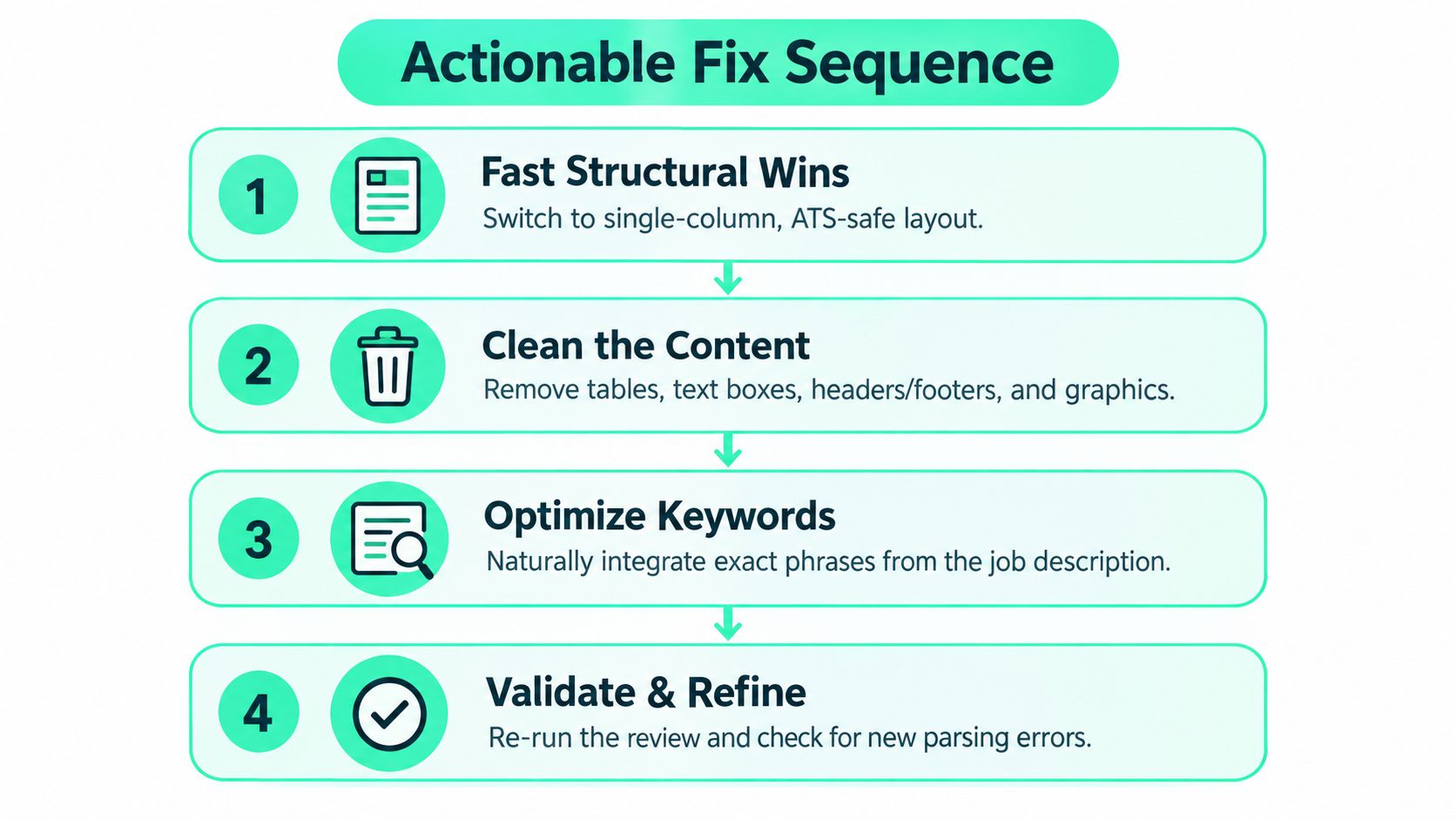
Start with the file itself.
Use a single-column layout
This improves the odds that sections, dates, and bullets are read in the intended order.
Remove tables, text boxes, and graphics
If information matters, it should appear as normal text in the body of the document.
Keep contact details in the main body
Put your name, phone, email, location, and relevant links near the top, but not inside a header or footer.
Choose a safer file format
When in doubt, a clean DOCX is often the safer testing version. If you export a PDF, check that the text is selectable and not visually fragmented.
Once the structure is stable, move to content.
A strong edit doesn't just add keywords. It aligns your real work to the employer's wording. Many applicants gain more from this than from another template swap.
Here are simple before-and-after examples:
Before
After
The second version is still readable to a human. But it also gives an ATS more to work with: tools, functions, and clearer role language.
Specificity improves both matching and credibility.
Instead of this:
Try this:
Even without adding numbers, that version is more searchable and more believable because it names scope and tasks more clearly.
Strong ATS writing usually sounds like accurate operational detail, not like SEO stuffing.
You do not need to rewrite every line for every application. Focus where changes have the highest return:
A resume tool saves real time when it suggests exact edits instead of generic tips. Our free resume builder has AI-assisted editing and ATS-friendly export, so you can apply job-specific changes without rebuilding the whole document by hand. If you'd rather compare builders first, we ranked ten in our ATS resume builder roundup.
One common mistake is improving match language while accidentally breaking structure. After tailoring, review the document again for reading order, section consistency, and formatting drift.
A simple final pass catches a lot:
The best fixes are usually sequential. Clean structure first. Stronger alignment second. Fine-tuning last.
A lot of public ATS advice assumes there's one universal version of a “safe” resume. That's convenient, but it isn't how these systems behave in practice.
ATS platforms differ in how they parse files and score relevance. A 2026 benchmark reported a 24-point score spread for the same resume across Workday, Greenhouse, Lever, iCIMS, and Taleo, and a separate 2026 parsing study found platform-specific failure rates ranging from 11.2% on Lever to 34.1% on Oracle Taleo, according to ResumeAdapter's ATS rejection benchmark.
That means the same resume can look healthy in one environment and shaky in another.
A practical strategy is to keep two layers:
A strong base resume
Clean format, standard headings, clear chronology, core skills
A targeted version for each role
Adjusted wording, reordered emphasis, and selected bullets that match the posting
This is more realistic than chasing a mythical perfect universal file.
If you're applying broadly, generic optimization is still useful. It reduces preventable parsing issues. But when a role matters, tailoring usually gives you the bigger gain because it responds to the actual job description and the likely filters attached to that opening.
The smarter question isn't “Is my resume ATS-friendly?” It's “Will this resume parse cleanly and sound relevant in the system this employer uses for this role?”
That question leads to better decisions.
Two things. First, parsing: whether the system can read your file and sort your name, contact details, employers, titles, dates, education, and skills into the right fields. Second, relevance: how closely your tools, skills, and responsibilities line up with the specific job posting. Fix parsing problems first, because a relevance check only means something if the file was read correctly.
Either works if the file is clean. One parsing summary reported lower failure rates for DOCX than for PDF, so a simple DOCX is a safe default. A single-column PDF with selectable text also parses well. Whichever you send, paste the exported file into a plain text editor and confirm it reads in the right order.
There is no universal passing number. Each tool weights keywords, sections, and formatting differently, so the same resume can score 70 in one and 85 in another. Use a score to compare versions of your own resume against the same posting in the same tool, and treat parsing errors as more urgent than any number.
Usually not. Most applicant tracking systems parse resumes into candidate records and let recruiters search, filter, and rank them. Some employers add knockout questions, such as work authorization, and a resume that parses badly or never uses the posting's terms is easy to miss in a search. A person still makes the rejection decision.
You find a job that fits. You submit your resume. Then nothing happens.
A quiet miss like that often feels random, but it usually is not. Your resume has to clear two separate gates. First, the ATS needs to read the file correctly. Second, it needs to judge your background as relevant enough to keep moving. A clean layout helps with the first gate. Strong alignment between your experience and the posting matters more at the second.
That distinction changes how you review your application. A parsing problem is like a shipping label the scanner cannot read. A matching problem is different. The label scans fine, but it is addressed to the wrong place.
Before you apply, run a short check:
Keep the review focused. If feedback says your formatting is clean, do not rewrite the whole document. If the file parses but your score stays weak, spend your time on relevance. Reorder bullets, swap in clearer language from the posting, and trim details that do not support this specific role.
That approach is more useful than chasing one perfect resume for every employer. Different systems handle files differently, and different openings emphasize different terms. The stronger habit is building a solid base resume, then adjusting the message for the job in front of you.
If you want a faster way to find openings and adapt your materials with more consistency, our AI job search connects job descriptions to targeted resume edits. Speed matters here too: applying early puts a well-matched resume in front of a recruiter before the pile grows.
FindMeJobs helps you discover openings quickly and tailor your resume to each posting with AI-assisted text suggestions, structured editing, and ATS-aware exports. It starts with a 7 day free trial, no card required.
A stronger next application usually comes from small, deliberate changes. Clear parsing. Clear fit. Then submit.
Ten resume builders for engineers compared on tailoring, ATS-safe export, version control, and price, plus a LaTeX option and a pre-submit checklist.
Seven resume scanners ranked on keyword gaps, edit guidance, and workflow fit, plus a repeatable test to find the one that actually improves your resume.
Ten ATS resume builders compared on keyword matching, edit control, export safety, and price, plus a validation test to run before you apply.